Home » Mobile, iPhone

iPhone Tethering on o2 UK, without paying £15-£30 p/m

During iPhone OS 3.0 Beta 5 we wrote an article about how to enable tethering on your iPhone. With the release of OS 3.0 we feel the need to refresh this content.

While Tethering is an official feature of OS 3.0, it is not enabled by default. Here in the UK, o2 require users to purchase a ‘Bolt-on’ package of either £15 or £30 per month, for 3gb and 10gb of data usage, respectively. Frankly, we’re outraged at these extortionate prices. o2’s iPhone tariffs already come with ‘Unlimited data usage’, so charging people an extra £15/£30 per month and adding data caps on top of that is just disgusting practise. Luckily, there’s a way around it.

All you need to get going, is the network details for your particular service provider, below we provide all the major iPhone network profiles, free for you to download. Once installed, you’re iPhone will be capable of tethering your ‘unlimited’ data to your pc/mac. Of course o2 will be clamping down on their Fair Use policy, so anyone using excessive bandwidth, or peer-to-peer software may be sent a warning, and then possible disconnect. So if you do tether, don’t be greedy! Take advantage of your great phone, but not your network. While o2 can’t tell if you’re tethering or not, they can see your data usage, so be sensible if you want to keep tethering for free.

To get started, download the appropriate ipcc file for your operator (at your own risk);
UK – o2
USA – AT&T
USA – T-Mobile
CA – Fido

Next is the trickiest bit;

Mac Users: You’ll need to open a terminal using Spotlight (cmd + space, Terminal) and type the command defaults write com.apple.iTunes carrier-testing -bool TRUE

Windows Users: Open a command prompt (Start > Run > cmd) and paste the following command (right click to paste, as CTRL+V doesn’t work in command prompt) “%ProgramFiles%\iTunes\iTunes.exe” /setPrefInt carrier-testing 1

Now just open iTunes, shift+click (on pc) / alt+click (on mac) restore and select the ipcc file. iTunes will say “Updating carrier settings” for a couple of second. Restart your iPhone – you now have the option to enable Tethering!
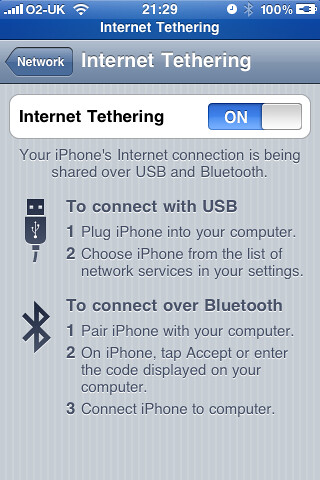
To turn on tethering, go to ‘Settings > General > Networking > Internet Tethering’, you can either use Bluetooth by pairing your phone with your computer, or you can simply plug in the USB cable and your mac should pop-up a message informing you that a new network device detected. It’s that simple, perfectly automated.

Share/Bookmark this!

  • iphonelover
    "An unknown error occurred (-27)" ?????
  • coredump
    getting the same error here! did u upgrade to 3.0.1?
  • Got it working! ^_^ Thanks.
    I should mention that you should avoid using safari to download the ipcc file. Use firefox!
    Also had to type the following command into the terminal to get iTunes to allow me to actually use the ipcc. "defaults write com.apple.iTunes carrier-testing -bool TRUE"
    All this is for Mac users!...not sure about windows >_< sorry.
  • moschleff
    The O2 package above gives me a zip file, shouldn't this be an ipcc file? Do you just change the extension?
  • Glad we could help ポール。

    カルベン。
  • Anthony
    The "defaults write com.apple.iTunes carrier-testing -bool TRUE" command, as mentioned in an earlier comment, is a required step. You have to do this. Either apply it with iTunes closed, or restart iTunes afterwards. If this step is skipped then the ipcc file will stay greyed out in the file selection dialog.

    One more thing I needed to do to get it working was fire up Assist Me (In Networking Prefs). This gives it a nudge otherwise It kept saying the cable was disconnected. Others elsewhere reported the same issue.

    I tried it on O2 briefly. Worked great. Didn't use it for too long for fear of O2 detecting it and charging me. If I do get charged I'll report back.
  • i think you need to update this guide, because i couldn't figure it out and ended up bashing my head against the screen
  • m
    cant get this to work as PC comes up with Syntax Error
  • when do you get the syntax error?
  • noodle13
    Why does everyone mention using iTunes for iPhone tethering? I didn't even open iTunes & set up tethering within minutes. Use it with an Apple laptop & Safari and there is simply no way that your service provider can prove you are using your iPhone for internet access; you will be using Safari on both iPhone & computer.
  • moschleff
    The O2 package above gives me a zip file, shouldn't this be an ipcc file?
blog comments powered by Disqus

Side Notes

This entry was posted by Calvin Robinson on June 23, 2009 at 09:12 and filed under Mobile, iPhone category.

You can add your comments or trackback from your own site. To keep you updated to the latest discussion, you can subscribe to these comments via RSS.

This is a Gravatar-enabled weblog. To get your own globally recognized avatar, please register at Gravatar.

Tags

amazon android Apple Apple iPhone App Store AT&T Bing Bluetooth deal Facebook Google Handhelds Hard disk drive Hardware iPhone IPod ITunes London Macintosh Microsoft Microsoft Windows Mobile phone Nvidia o2 Online Communities Operating system Palm Pre Search Search Engines Searching Smartphone Social network sony technology twitter Universal Serial Bus video Website Wi-Fi Windows 7 Windows Vista Wireless Xbox Xbox 360 Yahoo

Recent Comments